
If you are a social media manager, content creator, or freelancer, you know very well how quickly TikTok trends change. Clients expect speedy, engaging videos that look professional and can be uploaded. That is where CapCut Desktop Video Editor comes in handy. It makes editing TikTok content easy, fast, creative, and quick, even under pressing deadlines.
With CapCut PC, you get it all in one place, auto-captions, trending templates, AI effects, and speed control. These give you the power to produce videos that leave everyone speechless in a matter of seconds. The software is free to download, but there may be some of the more advanced features that require payment for full functionality.
You will understand in the next section how freelancers who work with CapCut PC create client-suitable TikTok content that springs to life in every scroll.
CapCut PC: A Freelancer Secret Tool for TikTok Projects
TikTok is a fast platform. Something new in trends, sound, and edits is available every day. Freelancers working together with clients on TikTok need tools that will keep them updated without losing quality. CapCut Desktop Video Editor offers them this speed without losing control.
With pre-drafted TikTok templates, freelancers can produce condense videos that are current with the trends in a minute. Templates save time and make it possible to produce a strong visual feel for each client more easily. The AI auto-captions, music synchronization, and effects library guarantee the same high quality on each project.
The desktop version of CapCut PC offers freelancers more space for work, smoother export, and more control over the timeline. It helps them plan and create short-form content that easily fits into video marketing for brands. All the tools are designed to accelerate the editing process, thus making it convenient for freelancers to get work done even when projects pile up.
In simple words, CapCut PC removes the drudgery involved in editing and enables freelancers to focus on what really matters, telling great stories that connect with people.
Top Freelance Reasons for Using CapCut PC
Freelancers have time constraints that they need to adhere to. Freelancers need time-saving tools, but still need high-quality outputs. CapCut PC is the TikTok Video Editor that does this using speed and convenience-oriented functions.
Its AI features, such as auto cutout, text-to-speech, and auto captions, assist in completing tasks quickly. Each tool performs painstaking jobs, so freelancers can concentrate on editing style and storytelling.
Its integrated filters, transitions, and effects assist in keeping pace with TikTok’s quick-moving trends and give every video a professional finish.
Computer edits can also be synced with CapCut Mobile via CapCut PC. This allows for minute edits when you are not at your computer. Freelancers can add client logos, text overlays, and brand colors to create brand identification in TikTok campaigns.
All the tools are free, apart from some paid premium effects and templates. CapCut PC also enables you to trim video clips to the short TikTok format without sacrificing important details or motion.
With combined speed and profound creative control, CapCut PC equips freelancers with the ability to deliver the best results at a minimal cost. It bridges the gap between professional quality and simplicity for creators of every level.
How to Create Client-Friendly TikTok Videos with CapCut Desktop Video Editor
Step 1: Download and Install CapCut PC
Go to the official CapCut website and download the CapCut Desktop Video Editor for Windows or Mac.
Proceed with the guide to install and then open the app. Sign up for a free account or log in to sync your projects across devices.

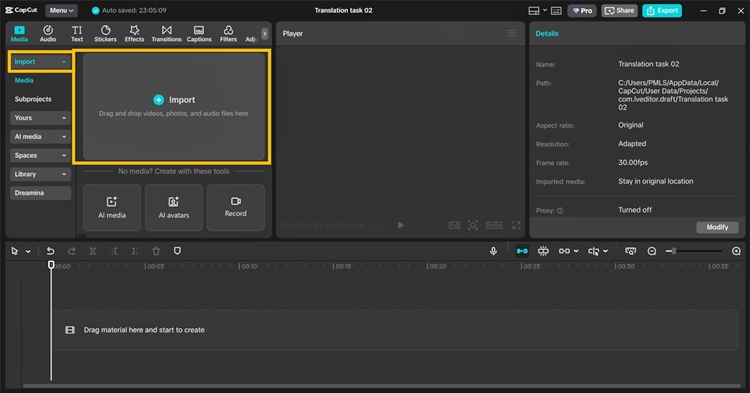
Step 2: Import Client Footage
Click the “Import” button on the top left. Select and upload your client’s video clips, background tracks, and logo files. Drop them into the timeline to arrange your project in the right order.
Step 3: Edit with TikTok Features
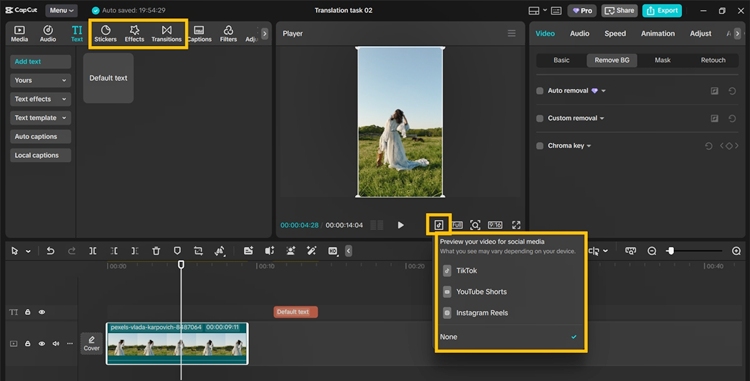
Use elements from the top-right toolbar bar such as auto captions, text-to-speech, and AI effects. Switch to the Template tab to access trendy TikTok templates. Trim or cut video clips under the Edit tab for TikTok’s short length.
Add stickers, filters, and transitions to make it personal. Preview your ultimate edit before exporting.
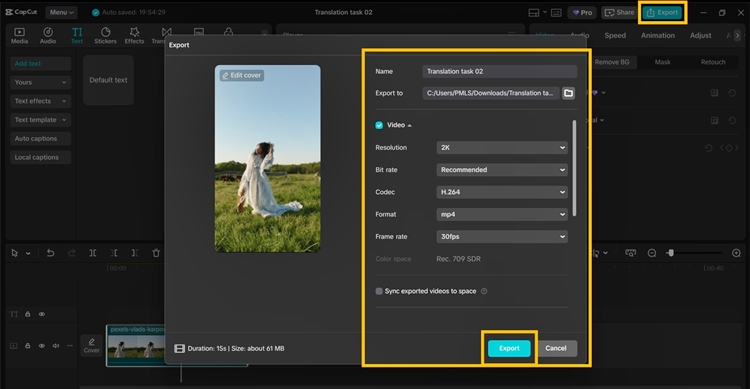
Step 4: Export and Deliver
Click “Export” at the top-right. Choose video resolution (1080p or 4K), frame rate, and format. Save your file and send it to customers through email, cloud link, or TikTok-ready format and directly upload to Tiktok.
Conclusion
Freelancers today need to deliver concise, memorable videos within seconds that grab the viewer’s attention. CapCut Desktop Video Editor allows you to do just that by offering you all the features you need to create stop-scrolling TikTok videos within seconds.
With CapCut PC, you are able to trim, make, and edit videos in a faster manner without compromising their professionalism and creativity. Most of the tools are free and are potent enough to help you make well-looking clips that can be uploaded by your clients instantly.
The editor saves time, keeps you creative, and ensures consistency of every project’s appearance and quality. It is made for freelancers who want to grow fast without wasting effort.
Download the CapCut Desktop Video Editor today and turn your client’s TikTok concept into a reality with just a few clicks!