
If you look at the camera roll on your phone right now, I bet I know what I will find. It is a graveyard of good intentions. There are hundreds of short clips. You have videos of orders being packed. You have shots of the sun hitting your shop window. You have a quick pan of your new inventory.
You took them because you thought they would make great content. But they are still sitting there. They are gathering digital dust because the gap between “filming a clip” and “posting a finished video” is huge. Editing is boring.

I run into this wall constantly. I have the raw materials, but I lack the energy to assemble them. I started looking for a way to automate the assembly line. That is how I found Vmake. It is a video platform that seems to understand this specific struggle. It isn’t trying to be Hollywood. It is trying to be helpful. I spent the last few days testing their “AI Agent” to see if it could finally clear out my camera roll and get my business visible again.
The Myth of “Perfect” Content
We need to unlearn a bad habit. We think business content needs to be polished. We think it needs a script and a microphone.
The data says the opposite. The best performing ads right now are UGC Videos. User Generated Content. These are raw, handheld videos that feel truly human. Sometimes, a clip of you struggling with a shipment box sells better than a polished product render. It builds trust.
But even “messy” content needs editing. It needs context. This is where the bottleneck happens.
Testing the Vmake Agent
I decided to test the “Vmake Agent” with a very mundane scenario. I pretended I owned a small coffee shop. The “event” was simply the morning setup. This is something that happens every day. It is visually satisfying but boring to explain.
I went to the Vmake dashboard. The agent is right there on the left.
I typed in a prompt. I wanted to see if it could find the story in the boredom.
The Prompt: “Make a 20-second video for a local coffee shop. Capture the early morning calm vibe. Highlight the sound of the grinder and the steam. Keep the tone warm and inviting.”
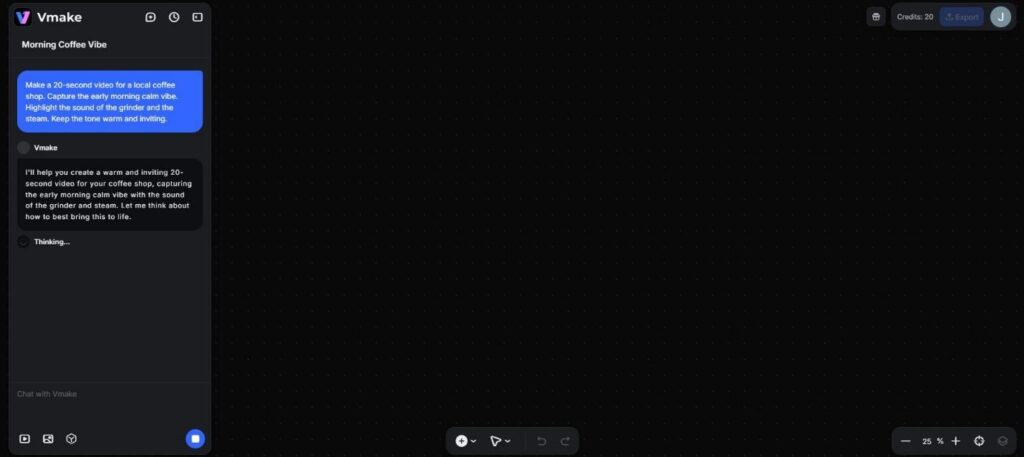
The Process: The AI didn’t just grab random clips. It started by building a logic flow. It generated a script that wasn’t salesy. It was atmospheric.
- Hook: “The world is too loud.”
- Body: Visuals of beans grinding and steam rising.
- payoff: “Find your quiet corner here.”
The Result: The video it spat out was surprisingly good. It used stock footage that looked like it was shot on an iPhone, which fits the UGC style perfectly. The cuts were slow and rhythmic, matching the “calm” vibe I asked for. The voiceover was soft.

I didn’t have to touch a timeline. I didn’t have to search for copyright-free lo-fi beats. It just did it. For a business owner, being able to turn a concept into a usable file in three minutes is a superpower. What’s more interesting is that the tool also lets you remove the video background so that you can change the video background in seconds.
Salvaging the “Bad” Footage
The Agent is great for creating something from nothing. But what about that graveyard of clips on your phone? The ones that are almost good enough?
I explored the other tools in the Vmake suite. They seem designed specifically for fixing the mistakes we make when we film in a rush.
The “Trash in the Frame” Problem. I had a clip of a product on a table. It was a great shot, but there was a crumpled receipt sitting right next to the item. It looked sloppy.
I used the “Video Watermark Remover.” The name implies it is just for logos, but it works on any unwanted object. I painted over the receipt. The AI analyzed the wood grain of the table and filled in the spot. The receipt vanished. The shot looked clean.

This allows you to stop worrying about having a perfect studio. You can film in your messy back room and clean it up in post-production.
The “Dark Warehouse” Problem. We don’t all have ring lights. Sometimes you film an unboxin,g and the lighting is yellow and grainy.
I tested the “AI Video Enhancer.” I uploaded a low-light clip. The tool sharpened the edges.
The Essential Step: Captions
If you are talking to the camera and you don’t have captions, you are wasting your breath.
Manually typing captions is the worst task in marketing. It is tedious. I used the Auto Captions tool. It listened to my video file. It transcribed the audio. It synced the text to the screen.
The accuracy was high. I had to fix one proper noun, but the timing was perfect. This feature ensures that your message gets across even when your customer is scrolling in a waiting room with their phone on mute.
A Workflow That Actually Works
Here is the reality of running a small business. You cannot block out four hours on a Tuesday to “do content.” You have to do it in the cracks of the day.
This tool makes that possible. Here is a workflow you can actually stick to:
- Capture the mundane. Film the steam rising off the coffee. Film the tape gun sealing a box. Film the “Open” sign as it flips.
- Fix the errors. If there is a coffee stain on the counter in the shot, use the remover tool. If it’s dark, use the enhancer.
- Generate the story. If you don’t know what to say, use the Agent. Tell it what you filmed and who you want to talk to. Let it write the script and assemble the edit.
- Caption and post.
The Bottom Line
We often paralyze ourselves by thinking we need to be creative geniuses. We don’t. We just need to be consistent.
Vmake removes the technical friction that stops consistency. It handles editing, cleaning, and scripting for you. You can turn everyday business moments into valuable brand-building content. You stop being a video editor and go back to being a business owner, the one with a very active social media feed.