
Have you ever watched a funny video and absolutely loved the background track? Or maybe you found a really great 40-minute motivational speech and wished you could listen to it on your way to work. You do not always need the visual part of a video. Sometimes, the audio track is the only thing you actually care about, which is why tools that let you download Facebook video as audio can be so useful.
Why Extract Audio from FB Videos?
Video files are huge. If you save a bunch of long videos to your phone, your storage will fill up very quickly. Plus, playing a video just to hear the sound is a massive waste of your phone’s battery life. The screen has to stay on the entire time to keep the file playing. By converting these video clips into MP3 audio files, you solve both of these problems instantly.
Audio files are tiny compared to videos. You can store thousands of them on your phone without worrying about space. You can build your own custom offline playlists for your morning jogs, your daily commute, or your gym workouts. You can even load these files onto a USB drive and play them directly in your car stereo. You also save your mobile data because you only download the file once and listen offline. Let us look at the best tools on the market that make this conversion process quick and easy.
Best 6 Tools for Media & Audio Conversion
Finding a tool that grabs audio without ruining the sound quality is very important. Here are the top 6 options you should consider in 2026.
1. FvidGo: High-Quality Audio Extractor
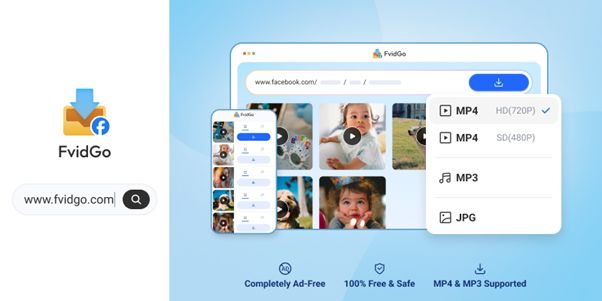
When it comes to pulling audio perfectly from a web page, FvidGo: Facebook downloader is the absolute best choice you can make right now. A lot of people assume FvidGo is strictly a tool for saving video files. However, it is actually a highly capable audio extractor as well. It is a fully online, web-based platform. This means you do not have to visit an app store or download any heavy installation packages to your device.
What truly makes FvidGo stand out is its strict commitment to sound quality. When you feed it a link, it does not just heavily compress the file and ruin the sound. It actively extracts the original audio track from the source. It then allows you to save that clean audio directly to your device. You get clear, crisp sound that is perfect for listening with headphones or playing loud on large speakers.
The user experience is also top-notch. Many free online converter sites are completely covered in fake download buttons and annoying pop-up ads that trick you into clicking them. FvidGo keeps everything incredibly clean and straightforward. There are zero ads to interrupt your task.
Furthermore, you do not need to register an account or hand over your email address. Your privacy is totally protected. Because it runs directly in your browser, it works universally. You can use it on your iPhone, your Android phone, your iPad, or your desktop computer. If you want a fast, secure, and high-fidelity way to grab music or speeches, FvidGo is exactly what you need for FB Reels download.
2. iTubeGo
If you are a professional user who prefers working on a computer, iTubeGo is a very robust option. This is premium desktop software that you install on your Windows PC or Mac. It is built for heavy-duty tasks. For example, if you need to extract audio from dozens of different links at the exact same time, its batch processing feature handles that perfectly. It gives you a lot of control over the final file format and audio bitrate. However, it is not a free tool. You need to buy a license to unlock its best features, and it does not help you if you just want to quickly save a song while using your mobile phone.
3. TubeMate
TubeMate is a very familiar name for long-time Android users. It is a dedicated mobile app that has been around for many years. When you use TubeMate to view a page, it gives you a clear menu of download options before you begin. You can easily scroll down the list and select the audio-only format. The extraction engine works very reliably. The only minor inconvenience is that the official app store does not host this type of tool. You have to go to their official website, download the APK file, and manually install it on your Android phone.
4. Snaptube
If you want a complete media center on your Android phone, Snaptube is an amazing application. It goes far beyond just one platform. It can pull audio and video from almost every major site on the internet. Snaptube has a really great built-in search bar. You can look for your favorite songs or speeches directly inside the app without switching back and forth between different windows. Once you find what you want, you just tap the download icon and select the MP3 option. Snaptube also organizes all your downloaded music into a neat folder, acting like a free offline music player.
5. Hitube

Next up is Hitube (hitube.io). This is a fantastic online service to keep saved in your browser bookmarks. Just like FvidGo, it focuses on being a lightweight, web-based tool. You do not need to install anything to use it. When you paste a link into Hitube, it quickly reads the page and offers you different ways to save the file. It is very fast and handles standard video-to-audio requests without any trouble. If you are ever on a public computer or using a friend’s phone and need to grab an audio file quickly, Hitube is a highly dependable backup option.
6. VidMate
VidMate rounds out our list as another powerhouse application for Android devices. It is very well known for its extremely fast download speeds. The app uses advanced technology to make sure your files download as quickly as your network allows. When you want to save a file, VidMate gives you clear buttons to separate the audio track from the visual video. A great feature is its background downloading capability. You can start saving a long podcast file and immediately minimize the app to answer text messages. VidMate will keep working silently in the background until your file is ready.
How to Save Facebook Audio with FvidGo
Are you ready to grab your first audio file? The process is so simple that anyone can do it. You do not need any special computer skills. Just follow these three easy steps:
- Copy the Target Link: Open your social media feed and find the video that contains the audio you want to keep. Tap the “Share” button at the bottom of the post. Look through the menu and select “Copy Link.”
- Paste into the Browser: Open up your favorite web browser, like Safari or Chrome, and type in fvidgo.com. Right in the center of the screen, you will see a large, empty text box. Tap inside that box and paste the link you just copied.
- Select Audio and Download: The website will immediately start processing your link. Wait just a couple of seconds. A preview will pop up along with your download choices. Instead of picking the standard video format, look for the audio format option. Tap the download button, and your high-quality sound file will be saved directly to your device’s storage.
Conclusion
Turning your favorite online videos into portable audio files should be a smooth and stress-free process. Having the right tool in your pocket makes a world of difference. If you are a heavy computer user who needs to process massive batches of files, a paid desktop program like iTubeGo makes sense. If you love having a dedicated music manager installed on your Android phone, Snaptube is incredibly convenient.
However, if you want the absolute easiest, fastest, and cleanest experience, the web-based FvidGo is your best bet for 2026. It costs nothing, requires zero installations, shows no annoying ads, and delivers perfectly clear audio files straight to any device you own. The next time you hear a great song or an inspiring speech online, just grab the link and head over to FvidGo. You will have your new audio file ready to play in seconds!